Bromcom
School ID: 17288
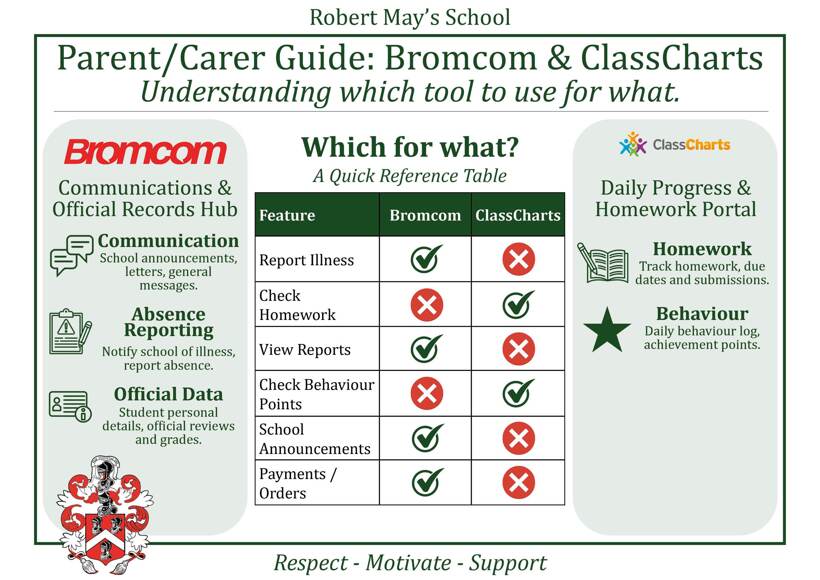
At Robert May’s School, we are always looking for ways to improve our partnership with families and streamline how we share information with you. To make managing school life more efficient, we are preparing to migrate EduLink and Wisepay to Bromcom.
For Parents/Carers, this means that communications, student absence reporting, reviews, and payments, will transition to the MyChildAtSchool (MCAS) portal and mobile app. Please note, this change will not affect ClassCharts use for you or your child. We understand that changing school systems can feel overwhelming. Therefore, we are planning a phased transition to keep things as simple as possible.
Please click on the following buttons for further details on the Bromcom (webpage) or MyChildAtSchool (MCAS app):

![]() | ![]() |
Planned Timeline:
| Weds 1st July | Your child’s EduLink account will have closed and their Bromcom account goes live. You will be sent login details to self-register. From this date, all communication will go through Bromcom and the My Child at School (MCAS) app, including absence reporting if your child is unwell or has an appointment. |
| Weds 1st July Thurs 2nd July 3-4pm Weds 8th July 5-6pm | We will be offering Bromcom support drop-in sessions in the Library, next to Main Reception. We will be on hand to assist any Parents/Carers that have been unable to self-register their account. |
| Mon 3rd August | Payments close on Wisepay, therefore any outstanding installment payments for trips/visits will need to be paid before this date. Please do not attempt to make any payments on Wisepay after this date. When your child’s Wisepay account closes, the balance on your child’s Wisepay account will be transferred to Bromcom, along with any payments you may have made towards future trips/visits (including installment plans). |
| Mon 10th August | Payment system opens on Bromcom. You will be able to top up your child’s canteen account in preparation for the return to school. |
| Thurs 3rd September | By the start of the new school year, all Parents/Carers should have self-registered their accounts. |
Please note, these dates may be subject to change but we will give you as much notice where possible.
Frequently Asked Questions:
I've forgotten which email I've registered to School with
Please email info@rmays.com, ensuring you include your child's name.
I've forgotten my password
Click the Reset Password link from the login page. See Bromcom's guide: How to reset MCAS Password
I didn't allow push notifications, but would like to change that
1. Check your phone's settings for the MCAS app to allow notifications
2. If that doesn't work, try deleting and reinstalling the app, this time make sure you 'allow notifications' when prompted.